 60% off
- Physics
- Ready-made model
- Printed report included
House Door Alarm Using Touch Sensor Physics Investigatory Project Model Engineering College & Science Teaching Aid
Code B0DML13NHC
- Paid for and delivered by Amazon or Flipkart. The current price and the delivery date for your PIN code are shown there.
- Sold by Gurukul Technicals Institute, Delhi.
- Need a different topic, a custom version or a school order? Ask on WhatsApp.
In this project guide
Ready-made model
About this model
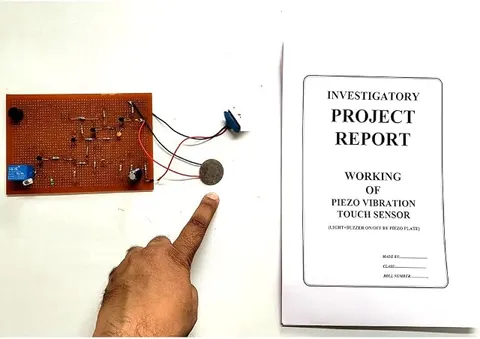
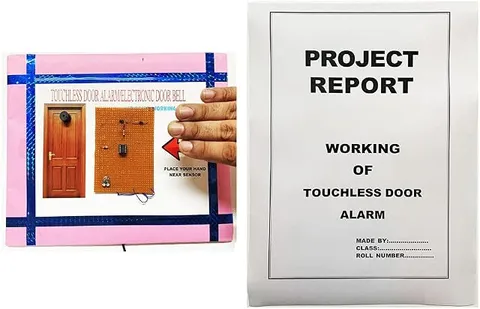
This working model is a house door alarm set off by a touch sensor, so touching the sensing point raises the alarm. It shows how the human body can become part of a circuit and how a tiny signal can be amplified enough to sound an alarm.
How it works
The science behind it
The idea the model demonstrates, in words you can use in your report and when you explain it.
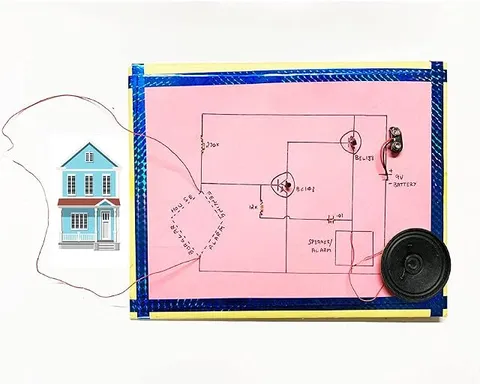
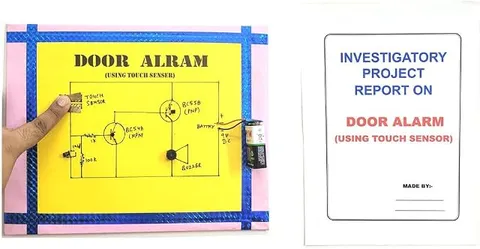
This alarm is a resistive touch circuit. Its touch sensor is two copper strips that do not touch each other: one is joined to the battery positive and the other to the amplifier input. A finger resting on both strips lets a very tiny current flow through the skin. It passes through a 1 kΩ resistor into the base of a BC548, an NPN transistor, which switches on. Its collector then draws current from the base of a BC558, a PNP transistor, which switches on and sounds the buzzer. The second transistor amplifies the already amplified current of the first, so the two current gains multiply and a light touch is enough. The 10 µF capacitor charges during the touch and then discharges slowly through the base and the 100 kΩ resistor, so the buzzer keeps sounding briefly after the finger is lifted. The 100 kΩ resistor also holds the input low, so the buzzer stays silent when nobody touches. Phone touch screens work differently: they sense the small change in capacitance a finger makes.
Make it yourself
Make a two-transistor touch sensor door alarm yourself
Build your own version from scratch, or use the steps to understand how the ready-made model is put together before you present it.
What you need 9
Step by step 10 steps
Draw the circuit large and clear on the chart paper: a positive rail along the top, a negative rail along the bottom, the touch strips on the left, the BC548 in the middle, the BC558 at the top right and the buzzer below it.
Fix the two copper strips one above the other, a few millimetres apart, so a fingertip can rest on both at once but the strips never touch each other.
Join one strip to the positive rail and the other to a point that will be the input of the circuit.
From the input point, connect the 1 kΩ resistor to the base of the BC548. Also connect the 10 µF capacitor (its striped negative leg to the negative rail) and the 100 kΩ resistor from the input point to the negative rail.
Connect the emitter of the BC548 to the negative rail and its collector to the base of the BC558.
Connect the emitter of the BC558 to the positive rail and its collector to the buzzer's positive (red) lead, and take the buzzer's other lead to the negative rail.
Push each part's legs through small holes over its symbol on the drawing, make the joints at the back, and connect the battery snap to the two rails, red wire to the positive rail.
Check every joint against the diagram, then clip on the 9 V battery: the buzzer should stay silent.
Rest a fingertip across both copper strips: the buzzer sounds, and keeps sounding for a moment after you lift your finger.
Try a dry finger, a slightly damp finger and a gloved finger, and note what happens for your project file.
Read this first
Safety first
Go through these points before you build or switch anything on. Younger students should do this with an adult.
- Use only the 9 V battery; never connect the touch strips to a real door, a doorbell circuit or anything connected to mains.
- The current through your finger is tiny at 9 V; never try the same idea with any higher-voltage supply.
- Solder, and make holes with the pin, only with an adult, and let joints cool before touching them.
- Fit the electrolytic capacitor the right way round (the stripe marks negative); reversed, it can swell or burst.
- Never short the battery terminals, and unclip the battery when the alarm is not being shown, as the board has no switch.
Troubleshooting
If something does not work
The usual problems with this model and how to fix them. Open a problem to see the fix.
The buzzer sounds all the time, even without a touch
Something is linking the input to the positive: the two copper strips touching, a solder bridge, or moisture. Separate the strips, dry the board, and check that the 100 kΩ resistor goes to the negative rail.
Nothing happens when I touch the strips
Check the pins: with the flat face towards you and the legs pointing down, both the BC548 and the BC558 read collector, base, emitter from left to right. Check the NPN and PNP are not swapped, and press both strips firmly; very dry skin may need a slightly damp finger.
The buzzer only clicks or is very faint
The battery is weak, or the buzzer is fitted the wrong way round. Fit a fresh battery and check that the buzzer's red lead goes to the BC558 collector.
The buzzer stops the moment the finger is lifted
The 10 µF capacitor sets this short hold time. Check it is fitted the right way round and well joined; a larger value makes the buzzer keep sounding for longer.
Exhibition day
How to present it
A running order for the exhibition table or the practical, step by step.
Let a judge touch the sensor and hear the alarm, then explain what happened inside the circuit.
Explain why the body can conduct a tiny current, and why a low-voltage battery circuit is safe to touch.
Trace the circuit drawn on the board: touch strips, the 1 kΩ resistor to the BC548 (NPN) base, the BC548 switching the BC558 (PNP), and the BC558 driving the buzzer; then show how the 10 µF capacitor and 100 kΩ resistor keep it sounding briefly.
Suggest where it could be used, such as a shop counter, a locker or a display case.
Practice
Viva questions
Practice questions on this model, with short answers. Try each one aloud before you open the answer.
How does a touch sensor detect a finger?
Either the skin lets a tiny current pass between contacts, or the finger changes the capacitance of a sensing pad, and the circuit detects that change.
Why does this circuit use two transistors?
The current through the skin is very small. The BC548 amplifies it and the BC558 amplifies it again, so the two gains multiply and the buzzer gets enough current.
Why is it safe to touch a battery-powered touch circuit?
At a few volts the body's resistance allows only a tiny current, far too small to be felt or to cause harm.
Name two devices that use touch sensing.
Smartphone touch screens and touch lamps.
Project file
Project file outline
The headings of the project file, in order. Give each heading its own section and write it in your own words.
The listing includes a printed project report: use this outline to check that your own file covers every part.
Free ebook: Writing a Science Project FileContents
- Aim: to make a door alarm that sounds when someone touches the touch sensor
- How the human body conducts a very small current
- The transistor as an amplifier and a switch: NPN and PNP transistors
- Circuit diagram of the touch alarm and the job of each part: the touch strips, the 1 kΩ and 100 kΩ resistors, the 10 µF capacitor, the BC548, the BC558 and the buzzer
- Resistive and capacitive touch sensors compared
- Observations: response with dry and damp fingers and through a glove
- Uses: touch lamps, lift buttons and security alarms
- Precautions with the battery and touch contacts, and conclusion
Buying checklist
Before you buy
What to check before you order the model, and what to do when it arrives.
1Before you order
- The board's circuit uses a BC548 (NPN) and a BC558 (PNP) transistor, so make sure your viva notes and project file explain this circuit.
- The box contents list the assembled board and a printed report but no battery, although a 9 V battery appears in some photos, so keep a fresh 9 V battery ready.
- The title on the board is spelt 'DOOR ALRAM (USING TOUCH SENSER)'; if your teacher minds, cover it with a neatly spelt label.
- Keep the box for transport, and protect the copper touch strips from being bent or knocked off.
- Check the delivery date for your PIN code on the marketplace, and order well before the exhibition or practical.
- The project report is a learning aid. Read it, understand how the model works, and write your own observations; schools expect your own work.
2When it arrives
- On arrival, clip on the battery and check that the buzzer stays silent until a finger rests on both copper strips; try several people's fingers.
Next steps
Take it further
Ways to turn this model into a bigger investigation or a stronger exhibition entry.
Try capacitors of different values in place of the 10 µF one and record how long the buzzer keeps sounding after the finger is lifted.
Add a 555 timer so the alarm keeps ringing for a set time after a single touch.
Compare it with a capacitive touch module and explain why the module can work through a thin plastic sheet.
Audience
Who it suits
Suits Class 9 to 12 physics investigatory projects, engineering college mini-projects and science teaching demonstrations.
- SubjectPhysics
- TypeReady-made model
- Project reportPrinted report included
Free to read
Free ebooks for this topic
Free PDF ebooks from Gurukul Technicals Institute on the science, the making and the presenting of projects like this one.
- Free PDF ebook
Physics Working Models Explained
Twenty classic models, how each works and how to make it
- Free PDF ebook
Investigatory Projects for Class 11 and 12
Topics, method and report structure for physics, chemistry and biology
- Free PDF ebook
Your Science Exhibition Guide
Choose a project, build it, present it and answer the judges with confidence
- Free PDF ebook
Writing a Science Project File
How to write the report, from the cover page to the bibliography