Head office, Rana Pratap Bagh, Delhi011 2721 1512+91 97116 99511

Project kits

Robotics and Coding

Robotics kits, Arduino and IoT project kits, line follower and obstacle avoider robots, smart dustbin and smart irrigation projects for school students, Atal Tinkering Labs, hobbyists and college.

  • Made to order
  • Quoted on WhatsApp
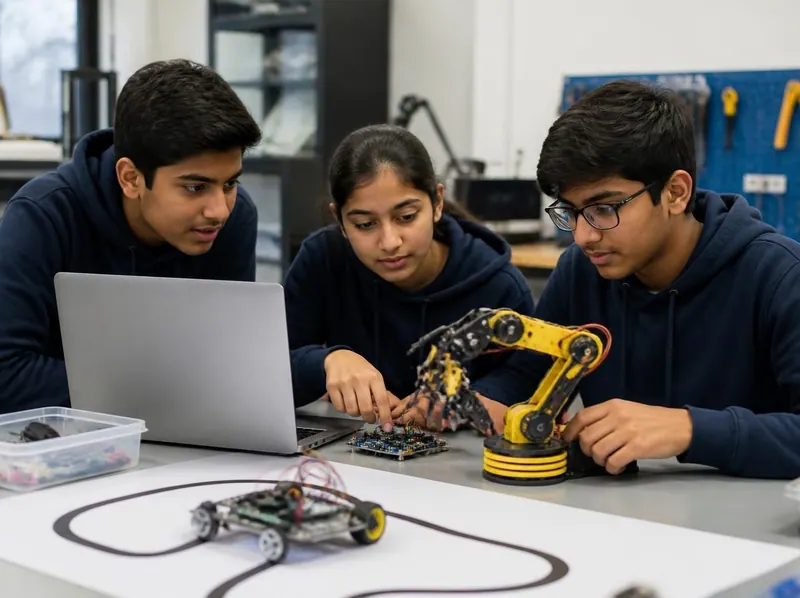
Three teenage students programming a robotic arm and a line-following robot from a laptop
Made to order

Nothing is listed here yet. Ask us to make it.

Robotics and Coding are made to order. Tell us what you need on WhatsApp and we reply with whether it can be made, the price and a dispatch date.

Put this in your message

  • The project, such as a line follower
  • Kit to build, or ready-built
  • The controller you prefer (Arduino Uno, NodeMCU or none)
  • The date you need it by

About Robotics and Coding

Robot kits and coding projects for school students, hobbyists and college beginners: line follower and obstacle avoider robots, Arduino starter projects, sensor projects such as a smart dustbin or automatic plant watering, and the motors, drivers and sensors to build your own. Line followers, obstacle avoiders and Arduino projects are also what students build in the robotics classes at the institute.

Read the full overview

Projects that can be made to order

  • A line follower robot with IR sensors and an L293D motor driver
  • Obstacle avoider and edge avoider robots
  • A gesture or hand-sensor controlled car
  • A smart dustbin with an ultrasonic sensor and a servo lid
  • Automatic plant watering with a soil moisture sensor
  • Arduino projects: LED patterns, a temperature-sensing fan, an automatic street light, a digital dice
  • A mobile-controlled robot using DTMF

Kit or ready-built?

A kit suits a student who will present the build and the code at an exhibition or a tinkering lab; ask for the code and the wiring diagram with it. A ready-built robot suits a demonstration where time is short. Tell us which you need.

Learning the basics first

If the student has never built a circuit, start with a components pack and a breadboard, then move to Arduino. The robotics classes at the institute follow a similar path; see Robotics in the menu.

Ordering

Message us on WhatsApp with the project, the controller you prefer (Arduino Uno, NodeMCU or none) and the date you need it by. We reply with the price and a dispatch date.

What goes into a school robot

Nearly every school robot, from a line follower to a smart dustbin, is built from the same six kinds of part.

  • Controller

    An Arduino Uno or a NodeMCU runs your code. Some simple robots use no controller, only sensors and a driver.

  • Motor driver

    A driver board such as the L293D or L298N lets the controller run the motors both ways.

  • Motors and wheels

    BO gear motors with wheels move the robot; a servo turns to an angle, for a lid or an arm.

  • Sensors

    IR sensors follow a line or spot an edge, an ultrasonic sensor measures distance, a soil sensor reads moisture.

  • Power

    A battery pack that can run the motors for a while, with the right connector for the controller.

  • Chassis and wiring

    The frame that holds it together, with jumper wires, screws and spacers.

Kit or ready-built robot?

Both teach something. Choose by how much time there is and who will present it.

  • Robot kit

    Best whenFor a student who will present the build and the code.

    • Ask for the wiring diagram and the code with it
    • Needs a computer with the free Arduino IDE to upload the code
    • Gives the most to talk about at an exhibition or in a tinkering lab
  • Ready-built robot

    Best whenFor a demonstration when time is short.

    • Test it the day it arrives
    • Still learn which part does what before you present it
    • Ask how to change the batteries and restart it
  • Parts for your own design

    Best whenFor students who already know the basics.

    • Motors, sensors, wires and breadboards
    • Start from a tested circuit diagram
    • Build and test one block at a time
    Spare parts (22)

Have these ready before you start

A robot build stalls most often for want of a cable or a battery. Gather these first.

  • A computer with the Arduino IDE installed (free from arduino.cc)
  • The right USB cable for your board
  • Fresh batteries, or a charged battery pack of the type the kit needs
  • A small screwdriver set and insulating tape
  • The code and the wiring diagram for the project
  • For a line follower, a sheet of white chart paper and black tape for the track

Safety with robots

Robots are low-voltage and safe to build, with care around batteries and moving parts.

  • Rechargeable batteries

    Charge lithium cells only with the right charger, never leave them charging unattended, and stop using any that swell or get hot.

  • Moving parts

    Keep fingers and hair clear of wheels and gears, and lift the robot off the table while testing on the bench.

  • Wiring

    Disconnect the power before changing any wire, and check plus and minus before reconnecting.

  • Younger children

    Screws, small wheels and magnets are choking hazards. Build with younger children and tidy parts away.

Learning at home

A path from first circuit to first robot

Students who skip the basics get stuck at the first fault. This order builds each skill on the one before.

  1. Simple circuits

    A battery, a switch, an LED and a motor: learn what each part does.

  2. Breadboard

    Build and change circuits without soldering, with resistors, LEDs and buttons.

  3. First Arduino code

    Blink an LED, read a button and sound a buzzer.

  4. Sensors

    Read an LDR, an IR sensor and an ultrasonic sensor, and print their values.

  5. Motors

    Drive two motors through a motor driver and control their speed.

  6. A complete robot

    Put it all together: a line follower or an obstacle avoider.

Tip: The free robotics ebooks on this page follow the same order.

Questions about Robotics and Coding

Still have a question?

Chat on WhatsApp
Which robot should a beginner build first?

An obstacle avoider or a line follower: two motors, one or two sensors and a short program. If the student has never built a circuit, start with an LED on a breadboard.

Do I need to know coding?

Not to start. Simple robots can run on sensors alone, and the Arduino code for a first robot is short and readable. The free Arduino ebooks on this page begin from zero.

Arduino Uno or NodeMCU?

An Arduino Uno is the usual starting point. A NodeMCU adds Wi-Fi, which suits IoT projects such as remote monitoring. Go with the board your teacher or guide expects.

Can you build a robot to order?

Message us on WhatsApp with the project, the controller you prefer and the date you need it by. We reply with whether it can be done, the price and a dispatch date.

Do you teach robotics too?

Yes. Gurukul Technicals Institute runs robotics and coding classes at the institute in Delhi. See Robotics in the menu for the age groups.

WhatsApp us