- Physics
- Ready-made model
- Class 10 to 12
- Printed report included
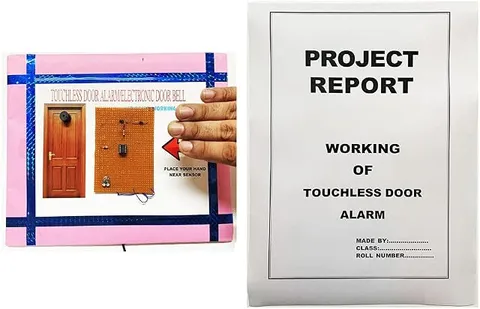
Touch Less Doorbell IR Based Electronic Doorbell Readymade Physics Working Investigatory Project & Model For School & College (Readymade Report Included), Multicolor, Kid
Code B099QYN322
- Paid for and delivered by Amazon. The current price and the delivery date for your PIN code are shown there.
- Sold by Gurukul Technicals Institute, Delhi.
- Need a different topic, a custom version or a school order? Ask on WhatsApp.
In this project guide
Ready-made model
About this model
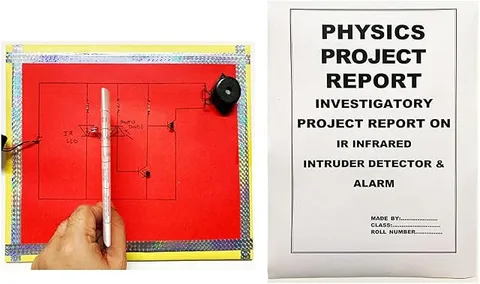
This readymade physics project is a touch-free doorbell that uses an infrared (IR) sensor to ring when a hand is brought near it, with no button to press. The listing says a readymade report is included, which saves time on the write-up for a school or college project.
How it works
The science behind it
The idea the model demonstrates, in words you can use in your report and when you explain it.
Infrared radiation is part of the electromagnetic spectrum with wavelengths longer than visible red light, roughly from 700 nm up to 1 mm, so our eyes cannot see it. A reflective IR sensor has two parts placed side by side: an IR LED that sends out infrared light and an IR receiver, usually a photodiode, that detects it. When a hand comes in front, it reflects some infrared back onto the receiver. A photodiode works in reverse bias, and the small current through it rises when more light falls on it. The circuit compares this signal with a set level, often using a comparator chip, and when the level is crossed it switches on the buzzer or bell. Many such circuits have a small preset to adjust how close a hand must come. Sunlight contains infrared, so strong sunlight can upset the sensor. A TV remote control also uses infrared to send its signals.
Make it yourself
Make a touch-free infrared doorbell yourself
Build your own version from scratch, or use the steps to understand how the ready-made model is put together before you present it.
What you need 10
Step by step 8 steps
Connect the sensor on its own first: VCC to the cells' positive and GND to negative. Its power LED should light, and a second LED on the module should come on when you hold your hand in front of it.
Measure the OUT pin with the multimeter: on most modules it reads close to the supply voltage with nothing in front and drops to near 0 V when a hand is close. Note which way yours behaves.
Look up the BC557's pin order in its datasheet, since a transistor fitted the wrong way round will not switch.
For a module whose output goes low, connect the transistor's emitter to positive, its base through the 1 kΩ resistor to OUT, and its collector to the buzzer's positive lead; the buzzer's negative lead goes to negative.
Switch on and bring your hand towards the sensor: the buzzer should sound while your hand is there and stop when you move away.
Turn the preset slowly until the bell rings only within about 5 to 10 cm, so people walking past do not set it off.
Fit the sensor behind the case window with its IR LED and receiver both facing out, and a thin strip of card between them so light cannot leak straight across.
Mount the case beside the model door, hide the cells behind the wall, and label the IR LED, photodiode receiver, comparator and buzzer.
Read this first
Safety first
Go through these points before you build or switch anything on. Younger students should do this with an adult.
- Run the doorbell on cells at 4.5 to 5 V; connecting a 9 V battery straight to the sensor module can damage it.
- Never connect this model to a real doorbell or house wiring; real doorbells are wired to the mains and are a job for an electrician.
- Put the cells into the holder the right way round, as a reversed supply can destroy the module's chip.
- Use the soldering iron and glue gun only with an adult, and let joints cool before touching.
Troubleshooting
If something does not work
The usual problems with this model and how to fix them. Open a problem to see the fix.
The bell rings all the time
The sensor sees something nearby or is set too sensitive. Point it at open space and turn the preset back until the bell stops. Sunlight also contains infrared and can confuse it, so test away from a sunny window.
The module's LED lights but the buzzer stays silent
Your module's output may go high instead of low, or the transistor is wired wrongly. Check OUT with the multimeter; if it rises when a hand is near, use an NPN BC547 instead, with the emitter to negative and the buzzer between positive and the collector.
It works for a white sheet but not for a dark sleeve
Dark objects absorb infrared and reflect little back. Turn the preset up slightly, and mention this at the exhibition as an interesting observation.
The buzzer only clicks
It is probably a passive buzzer, which needs a changing signal. Use an active buzzer (one that beeps when connected straight to cells) or a musical module.
Exhibition day
How to present it
A running order for the exhibition table or the practical, step by step.
Wave your hand at different distances to show the range at which the bell responds, and explain why there is a limit.
If your sensor has an IR LED, point a mobile phone camera at it; many phone cameras show its faint glow, which the eye cannot see.
Demonstrate indoors or away from direct sunlight, which contains infrared and can trigger the sensor falsely.
Explain why touch-free switches are useful for hygiene and for people who find small buttons hard to press.
Practice
Viva questions
Practice questions on this model, with short answers. Try each one aloud before you open the answer.
Where does infrared lie in the electromagnetic spectrum?
Between visible light and microwaves; its wavelength, roughly 700 nm to 1 mm, is longer than that of red light, so we cannot see it.
What are the roles of the IR LED and the photodiode in the sensor?
The IR LED sends out infrared light, and the photodiode detects the light reflected back by a nearby object such as a hand.
Why might the doorbell ring falsely in bright sunlight?
Sunlight contains infrared radiation, which can reach the photodiode and be mistaken for a reflection from a hand.
Name one everyday device that uses infrared.
A TV remote control sends its signals to the television as pulses of infrared light.
Project file
Project file outline
The headings of the project file, in order. Give each heading its own section and write it in your own words.
The listing includes a printed project report: use this outline to check that your own file covers every part.
Free ebook: Writing a Science Project FileContents
- Aim: to make a doorbell that rings when a hand is brought near, without touching a button
- Introduction: infrared radiation and the electromagnetic spectrum
- Working of the IR LED, the photodiode and the comparator
- The transistor as a switch to drive the buzzer
- Circuit diagram and list of components
- Construction and adjusting the sensing distance
- Observations: sensing distance for white, coloured and black objects
- Applications: touch-free taps, hand dryers, automatic doors and hygiene
- Conclusion, precautions and bibliography
Buying checklist
Before you buy
What to check before you order the model, and what to do when it arrives.
1Before you order
- Check whether your teacher wants an investigatory project with readings or only a working model, and plan the observations you will add.
- Test the sensor at once in a room away from sunlight, and set the sensing distance well before the exhibition.
- Check what cells or battery it needs and keep spares for the day.
- Check the delivery date for your PIN code on the marketplace, and order well before the exhibition or practical.
- Practise explaining it. Judges ask what the model shows and why; knowing the science matters as much as the model. The viva questions above are a good place to start.
2When it arrives
- The listing says a readymade report is included; read it when it arrives and add your own readings and circuit diagram in your own words.
- Carry it in its box with the sensor facing up so the IR LED and receiver are not bent.
Next steps
Take it further
Ways to turn this model into a bigger investigation or a stronger exhibition entry.
Add a 555 timer so the bell keeps ringing for a few seconds after a hand is detected, and explain the monostable circuit.
Use a microcontroller board to count how many visitors rang the bell and show the count on a small display.
Measure the sensing distance for objects of different colours and plot a bar graph of how well each reflects infrared.
Audience
Who it suits
Suits Class 9 to 12 physics investigatory projects and college-level beginner projects on sensors and electronics.
- ClassClass 10 to 12
- SubjectPhysics
- TypeReady-made model
- Project reportPrinted report included
Free to read
Free ebooks for this topic
Free PDF ebooks from Gurukul Technicals Institute on the science, the making and the presenting of projects like this one.
- Free PDF ebook
Physics Working Models Explained
Twenty classic models, how each works and how to make it
- Free PDF ebook
Investigatory Projects for Class 11 and 12
Topics, method and report structure for physics, chemistry and biology
- Free PDF ebook
Your Science Exhibition Guide
Choose a project, build it, present it and answer the judges with confidence
- Free PDF ebook
Writing a Science Project File
How to write the report, from the cover page to the bibliography