- Physics
- Ready-made model
- Class 10 to 12
Ontex Electronics House Door Alarm Using Touch Sensor Physics Investigatory Project Model Engineering College & Science Teaching Aid
Code B0DML13NHC
- Paid for and delivered by Amazon. The current price and the delivery date for your PIN code are shown there.
- Sold by Gurukul Technicals Institute, Delhi.
- Need a different topic, a custom version or a school order? Ask on WhatsApp.
In this project guide
Ready-made model
About this model
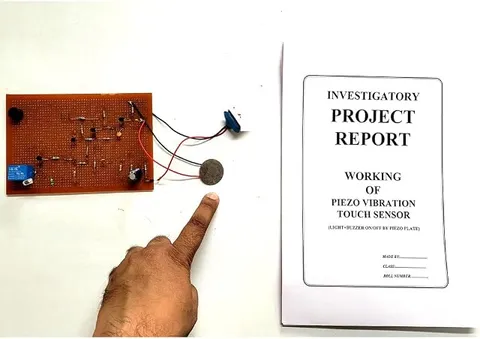
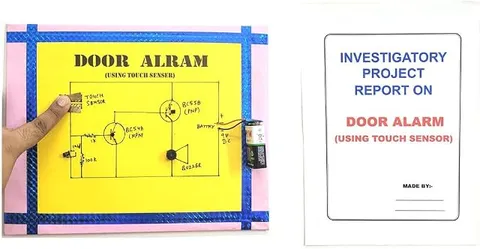
This working model is a house door alarm set off by a touch sensor, so touching the sensing point raises the alarm. It shows how the human body can become part of a circuit and how a tiny signal can be amplified enough to sound an alarm.
How it works
The science behind it
The idea the model demonstrates, in words you can use in your report and when you explain it.
Touch sensor circuits work in one of two common ways. In a resistive touch circuit, your finger bridges two metal contacts or touches a plate connected to a transistor's base. The skin lets a very tiny current flow, and a high-gain amplifier such as a Darlington pair, whose current gain is roughly β1 × β2, multiplies it enough to switch on a buzzer. In a capacitive touch sensor, like the modules many students use, the finger adds a small capacitance to a sensing pad; the chip notices the change and switches its output. Either way, a very small signal from the body is detected and turned into a strong output. Fitted on a door, the alarm can warn the household when someone touches the handle. Smartphone touch screens, touch-panel lift buttons and touch lamps all rely on sensing a finger in similar ways.
Make it yourself
Make a touch sensor door alarm yourself
Build your own version from scratch, or use the steps to understand how the ready-made model is put together before you present it.
What you need 8
Step by step 8 steps
Join the two transistors as a Darlington pair: the emitter of the first goes to the base of the second, and the two collectors are joined together.
Connect the buzzer's positive lead to the battery positive through the switch, and its negative lead to the joined collectors.
Connect the emitter of the second transistor to the battery negative.
Run one touch contact to the battery positive and the other, through the 1 kΩ resistor, to the base of the first transistor.
Fix the two contacts on the door handle a few millimetres apart, so a finger on the handle bridges them.
Switch on and touch both contacts at once: the tiny current through your skin is amplified and the buzzer sounds.
Hide the board behind the model door with short, tidy wires to the contacts, leaving the switch within reach.
Test with dry and with slightly damp fingers, and with a glove, and note the difference.
Read this first
Safety first
Go through these points before you build or switch anything on. Younger students should do this with an adult.
- Use only the 9 V battery; never connect the contacts to a real door, a doorbell circuit or anything connected to mains.
- The current through your finger is tiny at 9 V; never try the same idea with any higher-voltage supply.
- Solder only with an adult, and let joints cool before touching them.
- Switch the alarm off when it is not being shown so the battery does not drain.
Troubleshooting
If something does not work
The usual problems with this model and how to fix them. Open a problem to see the fix.
The buzzer sounds all the time, even without a touch
Something is linking the base to the positive: a solder bridge, contacts touching each other, or moisture. Check the board, dry it and move the contacts apart.
Nothing happens when I touch the contacts
Check the Darlington connections and each transistor's pin order (emitter, base, collector). Press both contacts firmly; very dry skin may need a slightly damp finger.
The buzzer only clicks or is very faint
The battery is weak, or the buzzer needs a different voltage. Fit a fresh battery and check the buzzer's rating.
It works on the table but not on the door
A wire to a contact may have come loose while fitting it. Re-solder the joints and keep the wires short.
Exhibition day
How to present it
A running order for the exhibition table or the practical, step by step.
Let a judge touch the sensor and hear the alarm, then explain what happened inside the circuit.
Explain why the body can conduct a tiny current, and why a low-voltage battery circuit is safe to touch.
Show the Darlington pair or sensor module on a diagram and label its input and output.
Suggest where it could be used, such as a shop counter, a locker or a display case.
Practice
Viva questions
Practice questions on this model, with short answers. Try each one aloud before you open the answer.
How does a touch sensor detect a finger?
Either the skin lets a tiny current pass between contacts, or the finger changes the capacitance of a sensing pad, and the circuit detects that change.
What is a Darlington pair?
Two transistors connected so that the current amplified by the first is amplified again by the second, giving a very high overall current gain.
Why is it safe to touch a battery-powered touch circuit?
At a few volts the body's resistance allows only a tiny current, far too small to be felt or to cause harm.
Name two devices that use touch sensing.
Smartphone touch screens and touch lamps.
Project file
Project file outline
The headings of the project file, in order. Give each heading its own section and write it in your own words.
Free ebook: Writing a Science Project FileContents
- Aim: to make a door alarm that sounds when someone touches the handle
- How the human body conducts a very small current
- The transistor as an amplifier and the Darlington pair
- Circuit diagram of the touch alarm and how it works
- Resistive and capacitive touch sensors compared
- Observations: response with dry and damp fingers and through a glove
- Uses: touch lamps, lift buttons and security alarms
- Precautions with the battery and touch contacts, and conclusion
Buying checklist
Before you buy
What to check before you order the model, and what to do when it arrives.
1Before you order
- Check whether the listing describes a transistor circuit or a touch sensor module, so you explain the right one in your viva.
- See whether the listing mentions a battery; keep a fresh 9 V battery ready if not.
- Keep the box for transport, and protect the touch point from being bent or knocked off.
- Check the delivery date for your PIN code on the marketplace, and order well before the exhibition or practical.
2When it arrives
- Test it on arrival with several people's fingers and note any spot where it does not respond.
Next steps
Take it further
Ways to turn this model into a bigger investigation or a stronger exhibition entry.
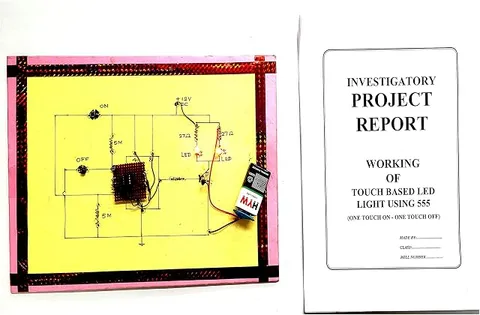
Add a 555 timer so the alarm keeps ringing for a set time after a single touch.
Replace the buzzer with a relay that switches a battery-powered lamp, and explain how a relay keeps two circuits separate.
Compare it with a capacitive touch module and explain why the module can work through a thin plastic sheet.
Audience
Who it suits
Suits Class 9 to 12 physics investigatory projects, engineering college mini-projects and science teaching demonstrations.
- ClassClass 10 to 12
- SubjectPhysics
- TypeReady-made model
Free to read
Free ebooks for this topic
Free PDF ebooks from Gurukul Technicals Institute on the science, the making and the presenting of projects like this one.
- Free PDF ebook
Physics Working Models Explained
Twenty classic models, how each works and how to make it
- Free PDF ebook
Investigatory Projects for Class 11 and 12
Topics, method and report structure for physics, chemistry and biology
- Free PDF ebook
Your Science Exhibition Guide
Choose a project, build it, present it and answer the judges with confidence
- Free PDF ebook
Writing a Science Project File
How to write the report, from the cover page to the bibliography