- Physics
- Ready-made model
- Class 1 to 9
Temperature Controlled Fire Alarm & Automatic Switch Physics Project Model
Code B0G2TBZ3ZC
- Paid for and delivered by Amazon. The current price and the delivery date for your PIN code are shown there.
- Sold by Gurukul Technicals Institute, Delhi.
- Need a different topic, a custom version or a school order? Ask on WhatsApp.
In this project guide
Ready-made model
About this model
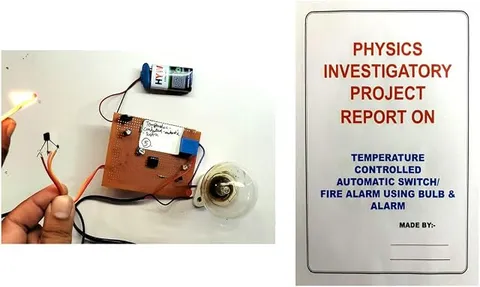
This working model watches the temperature and acts on its own: it raises an alarm or switches a device when things get too hot. It shows how a temperature sensor and a switching circuit work together, the same idea used in thermostats and overheating protection.
How it works
The science behind it
The idea the model demonstrates, in words you can use in your report and when you explain it.
The usual sensor for this kind of circuit is a thermistor, a resistor made of semiconducting metal oxides whose resistance changes sharply with temperature. In an NTC (negative temperature coefficient) thermistor, resistance falls as temperature rises. Placed in a voltage divider, it turns temperature into a voltage. A transistor or comparator compares that voltage with a set level, often adjusted with a potentiometer, and when the temperature crosses the threshold it switches on a buzzer or energises a relay. A relay is an electromagnetic switch that lets a small control current turn a separate, bigger load on or off, which is what makes it an automatic switch. Household appliances use the same logic with other sensors: a geyser's thermostat cuts off the heater at a set temperature, and an electric iron uses a bimetallic strip that bends when hot to break the circuit.
Make it yourself
Make a temperature-controlled alarm and automatic switch yourself
Build your own version from scratch, or use the steps to understand how the ready-made model is put together before you present it.
What you need 8
Step by step 8 steps
- Make the sensor divider
Thermistor from positive to a sensor point, and the 10 kΩ resistor from the sensor point to negative. The sensor voltage rises as the thermistor warms.
- Make the reference
Connect the preset's outer pins to positive and negative and its middle pin to the LM358's inverting input, pin 2.
Connect the sensor point to the non-inverting input, pin 3, then pin 8 to positive and pin 4 to negative.
Connect the output, pin 1, through the 1 kΩ resistor to the BC547's base. Connect the relay coil from positive to the collector, the emitter to negative, and the 1N4007 across the coil with its stripe towards positive.
Connect the buzzer and the LED (with its resistor) across the relay coil so they come on with it.
Wire the fan and its own cells through the relay's common and normally-open contacts, so the relay switches the fan on when it gets hot.
At room temperature, turn the preset until the relay just clicks off. Warm the thermistor with your fingers, or have an adult hold a cup of warm water near it: the relay clicks, the buzzer sounds and the fan starts.
Fix the thermistor where heat would build up in your model, such as above a 'stove' or inside a 'machine', and label each block.
Read this first
Safety first
Go through these points before you build or switch anything on. Younger students should do this with an adult.
- Test with warm water or your fingers, never with a flame or burning material.
- The relay switches only the low-voltage fan on its own cells; do not use it to switch mains appliances, which is work for a qualified electrician.
- Always fit the diode across the relay coil, or the voltage spike when the relay turns off can damage the transistor.
- Soldering and handling hot water need adult supervision.
Troubleshooting
If something does not work
The usual problems with this model and how to fix them. Open a problem to see the fix.
The relay chatters on and off near the set temperature
The sensor voltage is hovering at the switching point. Shield the thermistor from draughts, or add a high-value resistor (about 1 MΩ) from the output to pin 3 to give a little hysteresis.
The relay never switches
Measure the LM358's output as you warm the thermistor. If it goes high but the relay stays silent, check the transistor, the diode's direction and the relay's coil voltage.
The alarm is on all the time
The preset is set below the room-temperature level, or the thermistor and fixed resistor are swapped. Readjust, or swap them back.
The fan does not run when the relay clicks
It may be wired to the normally-closed contact, or its cells are flat. Use the common and NO contacts, and test the fan on its cells directly.
Exhibition day
How to present it
A running order for the exhibition table or the practical, step by step.
Warm the sensor gently, with warm air or by holding it, and show the circuit switching at the set point.
If your model has a preset, turn it to show how the trigger temperature can be changed.
Explain the relay with a diagram of its coil and contacts.
Compare your circuit with a geyser thermostat and the bimetallic strip in an iron.
Practice
Viva questions
Practice questions on this model, with short answers. Try each one aloud before you open the answer.
What is an NTC thermistor?
A thermistor whose resistance decreases as its temperature increases.
What is a relay?
An electromagnetic switch in which a small current through a coil moves contacts that switch a separate, larger circuit.
Why is a potentiometer used in such circuits?
To set the temperature at which the alarm or switch operates, by adjusting the reference voltage.
How does a bimetallic strip work in an electric iron?
It is made of two metals that expand by different amounts, so it bends when heated and breaks the circuit.
Project file
Project file outline
The headings of the project file, in order. Give each heading its own section and write it in your own words.
Free ebook: Writing a Science Project FileContents
- Aim: to make a temperature-controlled alarm that also switches a device on automatically
- Introduction: thermostats and overheating protection around us
- Materials and block diagram: sensor, comparator, driver, relay and outputs
- Circuit diagram
- Theory: the NTC thermistor, the voltage divider and the op-amp as a comparator
- How a relay lets a small current control a separate circuit
- Procedure and setting of the temperature limit
- Observations: thermistor resistance and alarm and fan state at different water temperatures (table)
- Applications, conclusion and precautions
Buying checklist
Before you buy
What to check before you order the model, and what to do when it arrives.
1Before you order
- Check that it suits your class and theme (sensors, heat or automation).
- Read the listing to see what the automatic switch controls in the model and what power it needs.
- Recheck the setting in the exhibition hall, since the room temperature may be different there.
- Keep the box and protect the sensor's legs in transport.
- Check the delivery date for your PIN code on the marketplace, and order well before the exhibition or practical.
- Practise explaining it. Judges ask what the model shows and why; knowing the science matters as much as the model. The viva questions above are a good place to start.
2When it arrives
- On arrival, have an adult hold warm water near the sensor to test it, and listen for the relay click.
Next steps
Take it further
Ways to turn this model into a bigger investigation or a stronger exhibition entry.
Use a thermometer and warm water to find the exact temperature at which your alarm switches, and set it to a chosen value.
Add hysteresis and explain why thermostats switch on and off at slightly different temperatures.
Swap the thermistor and the fixed resistor to make a frost alarm that triggers when it gets cold.
Audience
Who it suits
Suits Class 9 to 12 physics working models and investigatory projects on sensors and automation.
- ClassClass 1 to 9
- SubjectPhysics
- TypeReady-made model
Free to read
Free ebooks for this topic
Free PDF ebooks from Gurukul Technicals Institute on the science, the making and the presenting of projects like this one.
- Free PDF ebook
Electricity and Magnetism Experiments
Hands-on experiments with cells, wires, bulbs and magnets
- Free PDF ebook
Physics Working Models Explained
Twenty classic models, how each works and how to make it
- Free PDF ebook
Your Science Exhibition Guide
Choose a project, build it, present it and answer the judges with confidence
- Free PDF ebook
Writing a Science Project File
How to write the report, from the cover page to the bibliography