- Physics
- Ready-made model
- Class 1 to 9
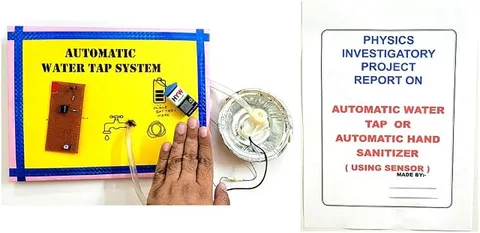
Automatic Water tap Cum Hand Sanitizer Working Project Model Educational Electronic Hobby Kit
Code B0DTY4ZKT4
- Paid for and delivered by Amazon. The current price and the delivery date for your PIN code are shown there.
- Sold by Gurukul Technicals Institute, Delhi.
- Need a different topic, a custom version or a school order? Ask on WhatsApp.
In this project guide
Ready-made model
About this model
This working model is an automatic, touch-free water tap combined with a hand sanitiser dispenser, the kind of contactless system now common in public washrooms. It is a good project on hygiene and automation, showing how a sensor can control a pump or valve without anyone touching it.
How it works
The science behind it
The idea the model demonstrates, in words you can use in your report and when you explain it.
Most automatic taps and sanitiser dispensers use an infrared (IR) proximity sensor. An IR LED sends out infrared light, which our eyes cannot see because its wavelength is longer than that of red light. When a hand comes close, some of this light reflects back onto an IR receiver such as a photodiode. The receiver's signal changes, and a control circuit, often a comparator chip or a small microcontroller, switches on a transistor or relay that runs a small pump or opens a valve. When the hand moves away, the reflection stops and so does the flow. A tiny sensor current can control a much larger pump current because the transistor or relay acts as an electrically operated switch. Touch-free systems reduce the spread of germs from shared surfaces and save water. Sensor taps at railway stations and airports, and the sanitiser stands used widely during COVID-19, work on this idea.
Make it yourself
Make a touch-free water tap and sanitiser dispenser yourself
Build your own version from scratch, or use the steps to understand how the ready-made model is put together before you present it.
What you need 8
Step by step 8 steps
Power one IR sensor and hold your hand in front of it; its on-board LED should light. Turn its small preset so it detects a hand only within about 5 to 10 cm.
Check whether the sensor's output goes low or high when a hand is near, and choose a relay module or transistor driver that switches on with that signal.
Connect the sensor's output to the relay module's input, and wire the pump through the relay's COM and NO contacts to the cells.
Put the pump in a bowl of water and test it: it should run only while your hand is near the sensor.
Build the washbasin housing, fix the tube end as the tap spout, and mount the sensor beside the spout pointing down at the hand position.
Repeat with the second sensor and pump for the soap dispenser, using a shorter tube and a narrow nozzle.
Place the containers and cells so that all the wiring stays above the water level, and put the tray under the spout.
Test with several people and adjust the presets so the tap does not switch on from the tray itself.
Read this first
Safety first
Go through these points before you build or switch anything on. Younger students should do this with an adult.
- Use liquid soap solution or coloured water in the model, not alcohol sanitiser, which is flammable and can damage a small pump.
- Keep the cells, relays and wire joints above and away from the water, with every joint taped.
- Never run the pumps dry, and never use a mains-powered pump in a student model.
- Ask an adult to use the glue gun and to make holes in the housing.
Troubleshooting
If something does not work
The usual problems with this model and how to fix them. Open a problem to see the fix.
The pump runs all the time
The sensor is seeing the tray or basin, or the relay module does not match the sensor's output level. Reduce the range with the preset, angle the sensor away from shiny surfaces, and check the trigger type.
The pump never runs, though the sensor's LED lights
The relay is not switching the pump. Check the relay's trigger type and supply, and that the pump is wired to the COM and NO contacts.
It works indoors but not near a sunny window
Sunlight contains infrared, which blinds the sensor. Shade the sensor or demonstrate away from direct sun.
The relay clicks but the water only trickles
Air may be trapped in the pump, or the cells are low. Prime the pump under water and fit freshly charged cells.
Exhibition day
How to present it
A running order for the exhibition table or the practical, step by step.
Bring your hand close and then take it away to show the flow starting and stopping on its own.
Explain the chain of events in order: the sensor detects the hand, the circuit switches on, and the pump or valve releases the liquid.
Point out how much water is saved compared with a tap left running while you soap your hands.
Keep the electrical parts dry and away from the liquid outlet, and wipe up any spills before visitors arrive.
Practice
Viva questions
Practice questions on this model, with short answers. Try each one aloud before you open the answer.
Which type of sensor is commonly used in automatic taps?
An infrared proximity sensor, which detects a hand by the infrared light it reflects.
Why can't we see the light from an IR sensor?
Infrared has a wavelength longer than that of visible red light, which is beyond the range our eyes can detect.
How does an automatic tap save water?
Water flows only while hands are under the tap and stops as soon as they are taken away.
In such circuits, why is a transistor or relay used to run the pump?
The sensor gives only a small signal, so a transistor or relay acts as a switch that lets this small signal control the larger current the pump needs.
Project file
Project file outline
The headings of the project file, in order. Give each heading its own section and write it in your own words.
Free ebook: Writing a Science Project FileContents
- Aim: to build a touch-free water tap and soap dispenser controlled by infrared sensors
- Materials
- How an infrared proximity sensor detects a hand
- Block diagram: sensor, driver and pump
- Circuit diagram
- Construction
- Observations: detection distance for different hands and sleeve colours
- Benefits for hygiene and for saving water
- Conclusion
Buying checklist
Before you buy
What to check before you order the model.
1Check these first
- Check that an automation project suits your class and the exhibition theme, such as health or technology.
- Check in the listing what power the model needs and whether batteries are included.
- Fill and test it a few days before the exhibition, and check that no water can reach the circuit.
- Carry a bottle of water or soap solution and a towel on the day.
- Keep the box for transport, and empty the containers before packing.
- Check the delivery date for your PIN code on the marketplace, and order well before the exhibition or practical.
- Practise explaining it. Judges ask what the model shows and why; knowing the science matters as much as the model. The viva questions above are a good place to start.
Next steps
Take it further
Ways to turn this model into a bigger investigation or a stronger exhibition entry.
Measure the flow rate and how long a hand stays under the tap, and estimate the water saved compared with an ordinary tap.
Add a timer so the soap dispenser gives the same small amount each time.
Use a microcontroller to count how many people used the tap and show the count on a display.
Audience
Who it suits
Suits Class 8 to 12 science exhibitions on automation, health and hygiene, and beginner electronics projects.
- ClassClass 1 to 9
- SubjectPhysics
- TypeReady-made model
Free to read
Free ebooks for this topic
Free PDF ebooks from Gurukul Technicals Institute on the science, the making and the presenting of projects like this one.
- Free PDF ebook
Physics Working Models Explained
Twenty classic models, how each works and how to make it
- Free PDF ebook
Your Science Exhibition Guide
Choose a project, build it, present it and answer the judges with confidence
- Free PDF ebook
Writing a Science Project File
How to write the report, from the cover page to the bibliography
- Free PDF ebook
Viva Questions for Science Projects
How to answer examiner questions, with sample questions for popular projects