- Physics
- Ready-made model
- Class 10 to 12
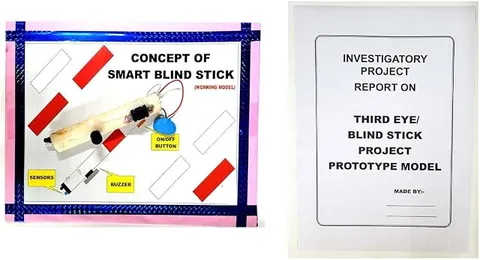
Smart Blind Stick or Third Eye Physics Educational Investigatory Project for School & Colleges
Code B0DK263M9B
- Paid for and delivered by Amazon. The current price and the delivery date for your PIN code are shown there.
- Sold by Gurukul Technicals Institute, Delhi.
- Need a different topic, a custom version or a school order? Ask on WhatsApp.
In this project guide
Ready-made model
About this model
This investigatory project is a smart blind stick, also called a third eye, that warns a visually impaired person about obstacles ahead before they touch them. It is a meaningful assistive-technology project that shows how sensors can help people move about more safely.
How it works
The science behind it
The idea the model demonstrates, in words you can use in your report and when you explain it.
Most smart blind sticks use an ultrasonic sensor, which works like the echolocation of a bat. The sensor sends out short pulses of ultrasound, sound with a frequency above 20,000 Hz that humans cannot hear. If an obstacle is in front, the pulse bounces back as an echo, and the circuit measures the time t between sending and receiving. Since the sound travels to the obstacle and back, the distance is d = (v × t) ÷ 2, where v, the speed of sound in air, is about 343 m/s at 20 °C. For example, an echo after 2 milliseconds means the obstacle is about 34 cm away. A small controller compares this distance with a set limit and sounds a buzzer or runs a vibration motor when something is too close. The parking sensors on many cars in India, which beep faster as you reverse towards a wall, use the same principle, as does SONAR on ships.
Make it yourself
Make an ultrasonic smart blind stick yourself
Build your own version from scratch, or use the steps to understand how the ready-made model is put together before you present it.
What you need 10
Step by step 8 steps
Connect the sensor to the board: VCC to 5 V, GND to GND, and Trig and Echo to two digital pins. Connect the buzzer between a third digital pin and GND.
- Write the program
Send a 10-microsecond pulse on Trig, measure how long Echo stays high, and work out the distance in centimetres as that time in microseconds × 0.0343 ÷ 2.
Print the distance to the computer's serial monitor and check it against a measuring tape at 20, 50 and 100 cm before going further.
- Add the warning
Beep when something is closer than about 100 cm, beep faster as it gets closer, and almost continuously below 30 cm.
Drive the vibration motor through the transistor: a digital pin through the 1 kΩ resistor to the base, emitter to GND, the motor between 5 V and the collector, and the diode across the motor with its band towards 5 V. Make it vibrate below 50 cm.
Fix the sensor on the stick about 30 to 40 cm above the tip, facing forward and slightly down.
Mount the board, battery and switch in the box near the handle, with the buzzer facing up and the vibration motor pressed against the inside of the box where the hand rests.
Run the wires along the stick with cable ties, connect the 9 V battery to the board's external power input, and test by walking slowly towards a wall.
Read this first
Safety first
Go through these points before you build or switch anything on. Younger students should do this with an adult.
- This is a school model, not a safety device; never give it to a visually impaired person to rely on in place of a proper cane.
- Always fit the diode across the vibration motor; without it the voltage spike when the motor switches off can damage the transistor.
- Use the soldering iron and glue gun only with an adult, and keep the stick's tip and edges smooth so nobody is hurt during demonstrations.
- Keep the electronics in a closed box and away from water; do not use the stick in rain unless the box is sealed.
Troubleshooting
If something does not work
The usual problems with this model and how to fix them. Open a problem to see the fix.
The distance reading is always 0 or jumps wildly
Trig and Echo may be swapped, or the sensor is not getting 5 V. Check the wiring, and make sure nothing, not even the stick, sits in front of the sensor's two round transducers.
It does not detect soft things like curtains or clothes
Soft surfaces absorb ultrasound and send back a weak echo. This is a real limitation of the sensor; mention it in your report and demonstrate with hard objects.
The buzzer beeps all the time
The sensor is probably seeing the ground. Tilt it up slightly, or lower the warning distance in the program.
It works on USB but stops on the battery
The battery may be weak or connected to the wrong pin. Connect it to the board's external power input (not the 5 V pin) and use a fresh battery.
Exhibition day
How to present it
A running order for the exhibition table or the practical, step by step.
Walk slowly towards a wall holding the stick to show the warning starting at a set distance.
Explain the formula d = (v × t) ÷ 2 and why we divide by two.
Compare the stick with a bat's echolocation using a simple drawing.
Talk about who the device helps and how it could be improved, for example with water sensing or GPS.
Practice
Viva questions
Practice questions on this model, with short answers. Try each one aloud before you open the answer.
What is ultrasound, and why can't we hear the stick's sensor?
Ultrasound is sound with a frequency above 20,000 Hz, which is beyond the range of human hearing, so the sensor's pulses are silent to us.
Why do we divide by 2 in the formula d = (v × t) ÷ 2?
Because the time measured is for the sound to travel to the obstacle and back, which is twice the distance.
What is the approximate speed of sound in air?
About 343 m/s at 20 °C; it increases slightly as the air gets warmer.
Name an animal that uses echolocation.
Bats use echolocation to find their way and catch insects in the dark; dolphins also use it underwater.
Project file
Project file outline
The headings of the project file, in order. Give each heading its own section and write it in your own words.
Free ebook: Writing a Science Project FileContents
- Aim: to make a walking stick that warns a visually impaired person about obstacles ahead
- Introduction: ultrasound, and echolocation in bats
- How the ultrasonic sensor works, and the formula d = (v × t) ÷ 2
- Block diagram and circuit diagram of the stick
- Program logic, with a flowchart
- Construction and mounting of the sensor
- Observations: distance shown by the stick compared with distance measured by tape
- Limitations and possible improvements
- Conclusion, social relevance and bibliography
Buying checklist
Before you buy
What to check before you order the model, and what to do when it arrives.
1Before you order
- Check with your teacher whether a programmed project is acceptable and whether you will have to explain the code.
- Read the listing to see whether the stick is described as programmed and ready, and what battery it needs.
- Keep a spare battery and the box, and carry the stick so the sensor is not knocked out of line.
- Check the delivery date for your PIN code on the marketplace, and order well before the exhibition or practical.
2When it arrives
- Test it as soon as it arrives by walking towards a wall and measuring the distance at which it starts to beep.
Next steps
Take it further
Ways to turn this model into a bigger investigation or a stronger exhibition entry.
Add a water sensor near the tip that sounds a different tone when the stick touches a puddle.
Add a second sensor pointing down to warn of steps or a drop ahead.
Add a light sensor and a bright LED that switches on in the dark so drivers can see the user.
Audience
Who it suits
Suits Class 9 to 12 physics investigatory projects and college-level projects on sensors and assistive technology.
- ClassClass 10 to 12
- SubjectPhysics
- TypeReady-made model
Free to read
Free ebooks for this topic
Free PDF ebooks from Gurukul Technicals Institute on the science, the making and the presenting of projects like this one.
- Free PDF ebook
Biology Models Guide
Make the heart, lungs, kidney, eye, cell and more, and explain them well
- Free PDF ebook
Physics Working Models Explained
Twenty classic models, how each works and how to make it
- Free PDF ebook
Investigatory Projects for Class 11 and 12
Topics, method and report structure for physics, chemistry and biology
- Free PDF ebook
Your Science Exhibition Guide
Choose a project, build it, present it and answer the judges with confidence