- Physics
- Ready-made model
Binary Counter Using IC4040 and IC555 Sequential Divider Project
Code B0G2T8CTX2
- Paid for and delivered by Amazon. The current price and the delivery date for your PIN code are shown there.
- Sold by Gurukul Technicals Institute, Delhi.
- Need a different topic, a custom version or a school order? Ask on WhatsApp.
In this project guide
Ready-made model
About this model
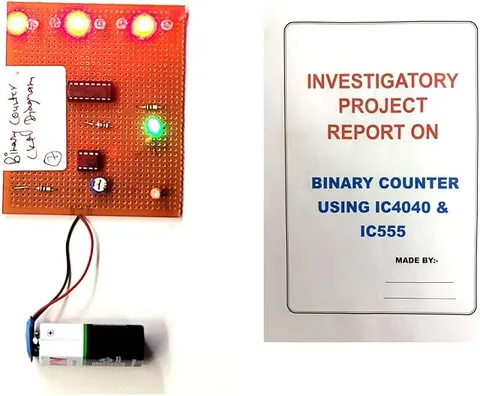
This project counts in binary using two classic ICs: a 555 timer that produces a steady stream of clock pulses and a 4040 counter that counts them. It shows how digital circuits count, divide frequencies and keep time, which are the foundations of clocks, timers and computers.
How it works
The science behind it
The idea the model demonstrates, in words you can use in your report and when you explain it.
The 555 timer, wired in astable mode, keeps switching its output between high and low, producing a square-wave clock. Its frequency is about f = 1.44 / ((R1 + 2R2) × C), so changing the resistors or the capacitor changes the speed. The CD4040 is a 12-stage ripple binary counter. Each stage is a flip-flop that changes state once for every two pulses it receives, so each output runs at half the frequency of the one before it: Q1 at f/2, Q2 at f/4 and Q12 at f/4096. With LEDs on the outputs, the count appears in binary, from 0 up to 4095 (2¹² − 1) before it rolls over to 0. This divide-by-two chain is exactly how a quartz wall clock works: its crystal vibrates 32,768 times a second, and 15 divide-by-two stages (2¹⁵ = 32,768) bring that down to one tick per second.
Make it yourself
Make a binary counter with a 555 and a 4040 yourself
Build your own version from scratch, or use the steps to understand how the ready-made model is put together before you present it.
What you need 8
Step by step 8 steps
Fit both ICs (in sockets) across the centre channel of the breadboard, notches facing the same way.
Wire the 555 as a clock: pins 8 and 4 to positive, pin 1 to negative, R1 from pin 8 to pin 7, R2 from pin 7 to pin 6, pins 6 and 2 joined, the 10 µF capacitor from pin 2 to negative (negative leg to negative), and the 0.01 µF capacitor from pin 5 to negative.
- Test the clock
Connect an LED with the 1 kΩ resistor from pin 3 to negative. With these values it should blink about once every one and a half seconds (f = 1.44 / ((R1 + 2R2) × C)).
- Power the 4040
Pin 16 to positive and pin 8 to negative, with the 0.1 µF capacitor across them. Connect the 555's pin 3 to the 4040's clock input, pin 10.
Hold the reset pin, pin 11, at negative through the 10 kΩ resistor, and connect the push button from pin 11 to positive so pressing it clears the count.
Connect an LED with a 2.2 kΩ resistor to each output you want to show, starting with Q1 to Q4, following the 4040's pin diagram.
Switch on, press reset and watch the LEDs count up in binary: Q1 changes on every clock pulse, Q2 on every second pulse, Q3 on every fourth.
Arrange the LEDs from right to left with their place values printed below, so visitors can read the number.
Read this first
Safety first
Go through these points before you build or switch anything on. Younger students should do this with an adult.
- Use the 9 V battery only; CMOS chips like the 4040 are damaged by higher voltages.
- Touch a metal tap or other earthed metal before handling the 4040, to discharge static, and hold ICs by their ends.
- Insert ICs and electrolytic capacitors the right way round; a reversed IC heats up quickly and a reversed capacitor can burst.
- Solder the final board only with adult supervision.
Troubleshooting
If something does not work
The usual problems with this model and how to fix them. Open a problem to see the fix.
The clock LED does not blink
Check the 555 wiring, especially that pins 2 and 6 are joined and pin 4 goes to positive, and check the capacitor's polarity.
The counter LEDs light randomly
The reset pin may be floating. Make sure the 10 kΩ resistor holds it at negative, and fit the 0.1 µF capacitor close to the 4040's supply pins.
The count skips numbers
Noise on the clock line can be counted as extra pulses. Keep the clock wire short and the supply capacitor close to the 4040.
It counts too fast to follow
Increase R2 or the capacitor's value to slow the 555 down.
Exhibition day
How to present it
A running order for the exhibition table or the practical, step by step.
Slow the clock down, if the timing parts allow, so judges can read each binary number on the LEDs.
Write the value of each LED (1, 2, 4, 8 and so on) above it so the count is easy to follow.
Explain frequency division by showing that each LED blinks half as fast as the one before it.
Link the project to the quartz clocks and timers that use the same divide-by-two chain.
Practice
Viva questions
Practice questions on this model, with short answers. Try each one aloud before you open the answer.
In which mode is the 555 used here, and why?
In astable mode, because it then oscillates freely and produces a continuous train of clock pulses.
What is the maximum count of a 12-stage binary counter?
4095, since 2¹² − 1 = 4095; after that it resets to 0.
Why is the 4040 called a ripple counter?
Because each flip-flop is clocked by the output of the one before it, so a change ripples through the stages one after another.
If the clock is 1 kHz, what is the frequency at output Q4?
f/2⁴ = 1000/16 = 62.5 Hz.
Project file
Project file outline
The headings of the project file, in order. Give each heading its own section and write it in your own words.
Free ebook: Writing a Science Project FileContents
- Aim: to build a binary counter using a 555 timer and a 4040 counter
- Introduction: the binary number system and why computers use it
- Materials, block diagram and full circuit diagram
- The 555 timer in astable mode and its frequency formula
- The 4040 ripple counter: flip-flops and divide-by-two stages
- Procedure: building and testing the clock, then the counter
- Observations: LED pattern for the first 16 counts with decimal values (table)
- Frequency division and its use in clocks, timers and computers
- Conclusion and precautions for handling CMOS chips
Buying checklist
Before you buy
What to check before you order the model, and what to do when it arrives.
1Before you order
- Binary counting and digital ICs suit senior classes and computer science projects; check it matches your level.
- Read the listing for the power source, how many outputs are shown and whether a report is included.
- Keep a spare battery, since the counter must run throughout the exhibition.
- Keep it in its box to protect the IC pins and LEDs.
- Check the delivery date for your PIN code on the marketplace, and order well before the exhibition or practical.
- Practise explaining it. Judges ask what the model shows and why; knowing the science matters as much as the model. The viva questions above are a good place to start.
2When it arrives
- On arrival, check the LEDs count up correctly from zero after reset, and again a few days before the event.
Next steps
Take it further
Ways to turn this model into a bigger investigation or a stronger exhibition entry.
Time 20 clock blinks to measure the 555's frequency and compare it with the formula.
Use the divided outputs to build a simple timer that marks every minute.
Add a decoder and a 7-segment display to show counts from 0 to 9 in decimal, resetting at 10.
Audience
Who it suits
Suits Class 11 and 12 physics or computer science projects on digital electronics, and diploma or engineering students learning counters and timers.
- SubjectPhysics
- TypeReady-made model
Free to read
Free ebooks for this topic
Free PDF ebooks from Gurukul Technicals Institute on the science, the making and the presenting of projects like this one.
- Free PDF ebook
Physics Working Models Explained
Twenty classic models, how each works and how to make it
- Free PDF ebook
Your Science Exhibition Guide
Choose a project, build it, present it and answer the judges with confidence
- Free PDF ebook
Writing a Science Project File
How to write the report, from the cover page to the bibliography
- Free PDF ebook
Viva Questions for Science Projects
How to answer examiner questions, with sample questions for popular projects