- Physics
- Ready-made model
- Class 10 to 12
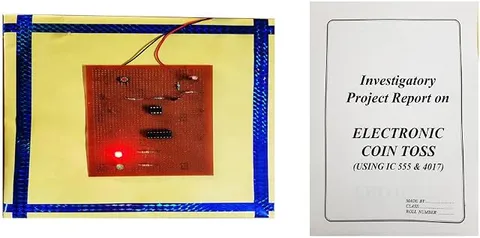
Electronic Coin Toss Heads or Tails Physics Working Model Educational Investigatory Project
Code B0BN2FPL9Z
- Paid for and delivered by Amazon. The current price and the delivery date for your PIN code are shown there.
- Sold by Gurukul Technicals Institute, Delhi.
- Need a different topic, a custom version or a school order? Ask on WhatsApp.
In this project guide
Ready-made model
About this model
This electronic coin toss model decides heads or tails electronically instead of flipping a real coin. It is a simple, engaging way to show how a digital circuit with two states works and to test the idea of probability.
What the listing says
- Electronic Coin Toss Heads or Tales Physics Working Model Educational Investigatory Project
How it works
The science behind it
The idea the model demonstrates, in words you can use in your report and when you explain it.
A fair coin has two equally likely outcomes, so heads and tails each have a probability of 1/2. An electronic coin toss copies this with a circuit that has two stable states. A common design uses a fast oscillator to drive a flip-flop, a circuit that changes from one state to the other on every clock pulse and holds its state when the pulses stop. One state shows heads and the other shows tails. Because the flip-flop switches thousands of times a second, nobody can choose the moment it stops, so the result is fair. The two states can be read as the binary digits 1 and 0, which is exactly how computers store information. In 10 tosses you might get 7 heads, but over 1000 tosses the fraction of heads comes very close to 1/2; this is called the law of large numbers. The toss before a cricket match is India's most famous coin toss.
Make it yourself
Make an electronic coin toss yourself
Build your own version from scratch, or use the steps to understand how the ready-made model is put together before you present it.
What you need 8
Step by step 8 steps
- Build the 555 clock
1 kΩ from pin 8 to pin 7, 10 kΩ from pin 7 to pins 2 and 6 (joined), 0.1 µF from pins 2 and 6 to negative, pin 1 to negative, pin 8 to positive, and 0.01 µF from pin 5 to negative.
Hold the 555's reset, pin 4, low with the second 10 kΩ resistor to negative, and fit the push button from pin 4 to positive, so the clock runs only while the button is pressed.
Wire one half of the CD4013: pin 14 to positive, pin 7 to negative, and its set (pin 6) and reset (pin 4) to negative. Tie the unused half's inputs, pins 8, 9, 10 and 11, to negative as well.
Join the data input D (pin 5) to the Q-bar output (pin 2). The flip-flop now changes state on every clock pulse.
Connect the 555's output, pin 3, to the flip-flop's clock input, pin 3.
Connect the heads LED and its resistor from Q (pin 1) to negative, and the tails LED and its resistor from Q-bar (pin 2) to negative.
- Slow-motion test
Swap the 0.1 µF for the 100 µF capacitor, hold the button and watch the LEDs take turns about once a second. Then put the 0.1 µF back.
Toss 100 times, tally heads and tails, and work out the relative frequency of heads after every 10 tosses.
Read this first
Safety first
Go through these points before you build or switch anything on. Younger students should do this with an adult.
- Use the soldering iron only with an adult, rest it in its stand, and let joints cool before touching.
- Fit the ICs with their notches matching the board, and the 100 µF capacitor with its long leg towards pins 2 and 6.
- Tie every unused CD4013 input to negative; floating inputs can make the chip warm up or behave strangely.
- Use only the 9 V battery and switch off when you leave the table.
Troubleshooting
If something does not work
The usual problems with this model and how to fix them. Open a problem to see the fix.
The same LED stays on however often I press
The flip-flop is not toggling. Check that D (pin 5) is joined to Q-bar (pin 2), that the clock reaches pin 3, and that set and reset are at negative.
Both LEDs seem lit while the button is held
That is normal: the LEDs swap hundreds of times a second, too fast for the eye. Only one should stay lit after you let go.
Nothing happens when the button is pressed
Pin 4 is not reaching positive, or the 555 is wired wrongly. Use the 100 µF slow-motion capacitor and an LED on pin 3 to check that the clock blinks.
The results seem to follow a pattern
The clock may be too slow, so the press time decides the result. Make sure the 0.1 µF capacitor is fitted, and press for different lengths of time.
Exhibition day
How to present it
A running order for the exhibition table or the practical, step by step.
Toss 50 times with the audience, keep a tally and compare it with the expected 25 heads and 25 tails.
Explain how the flip-flop gives just two states, like 1 and 0 in binary.
Discuss why short runs can be uneven while long runs settle near 1/2.
Open with the toss before a cricket match to catch the audience's attention.
Practice
Viva questions
Practice questions on this model, with short answers. Try each one aloud before you open the answer.
What is the probability of getting tails in a fair toss?
1/2, as there are two equally likely outcomes.
What is a flip-flop?
A digital circuit with two stable states that can store one bit, 0 or 1.
Why can't the user control the result?
The circuit switches between heads and tails thousands of times a second, far faster than a person can react.
What does the law of large numbers say?
As the number of trials increases, the experimental probability gets closer to the theoretical probability.
Project file
Project file outline
The headings of the project file, in order. Give each heading its own section and write it in your own words.
Free ebook: Writing a Science Project FileContents
- Aim: to make an electronic coin toss and test whether heads and tails are equally likely
- Introduction: probability of a fair coin, P(heads) = 1/2
- Two-state circuits: the flip-flop and the binary digits 1 and 0
- The 555 clock and the toggling D flip-flop
- Circuit diagram and construction
- Observations: tally of 100 tosses and the running relative frequency
- Graph of the relative frequency of heads against the number of tosses
- Uses of flip-flops in computer memory and counters
- Conclusion and bibliography
Buying checklist
Before you buy
What to check before you order the model, and what to do when it arrives.
1Before you order
- Check whether your teacher wants this as a probability project or a digital electronics project, so you prepare the right explanation.
- Read the listing to see how the toss is started and what powers it.
- Bring a tally chart of your own results to the exhibition, as real data makes a stronger project.
- Keep the box for transport.
- Check the delivery date for your PIN code on the marketplace, and order well before the exhibition or practical.
- Practise explaining it. Judges ask what the model shows and why; knowing the science matters as much as the model. The viva questions above are a good place to start.
2When it arrives
- Try at least 50 tosses as soon as it arrives to check both outcomes appear.
Next steps
Take it further
Ways to turn this model into a bigger investigation or a stronger exhibition entry.
Toss a real coin 100 times as well and compare the two sets of results.
Record the longest run of heads in 100 tosses and compare it with your classmates' results; long runs surprise most people.
Use the second flip-flop in the chip to make a two-coin toss and test the probabilities of two heads, one of each and two tails, which should be 1/4, 1/2 and 1/4.
Audience
Who it suits
Class 8 to 12 students who want a project combining electronics with probability, and teachers demonstrating binary states.
- ClassClass 10 to 12
- SubjectPhysics
- TypeReady-made model
Free to read
Free ebooks for this topic
Free PDF ebooks from Gurukul Technicals Institute on the science, the making and the presenting of projects like this one.
- Free PDF ebook
Physics Working Models Explained
Twenty classic models, how each works and how to make it
- Free PDF ebook
Investigatory Projects for Class 11 and 12
Topics, method and report structure for physics, chemistry and biology
- Free PDF ebook
Your Science Exhibition Guide
Choose a project, build it, present it and answer the judges with confidence
- Free PDF ebook
Writing a Science Project File
How to write the report, from the cover page to the bibliography